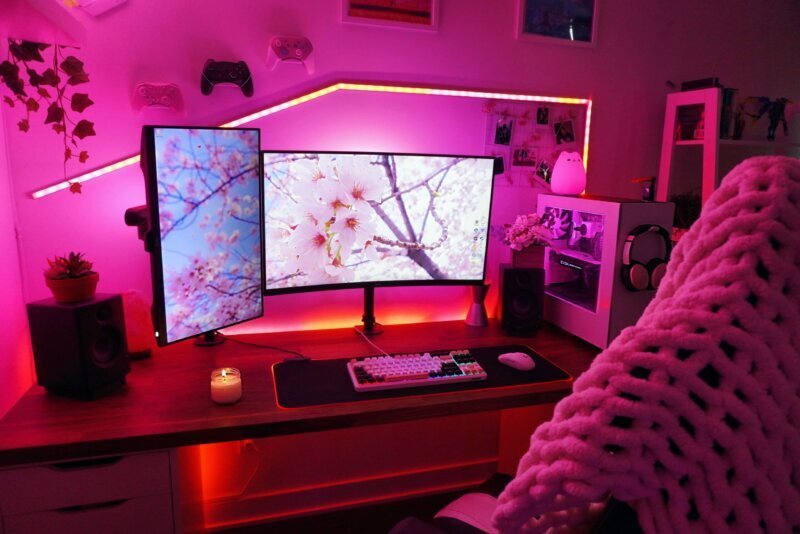
Ever wondered how top streamers manage to look and sound so polished? It's not magic; it's a meticulously crafted setup. For anyone looking to dive into the world of live content, mastering your equipment is the first step toward creating engaging, professional-quality broadcasts. Whether you're aiming for Twitch, YouTube, or Facebook Live, investing in the right tools makes all the difference. Today, we're pulling back the curtain on Roxie's Streaming Setup & Gear to give you a comprehensive guide to building your own high-caliber stream.
No more fumbling with fuzzy audio or pixelated video. We'll walk you through every piece of essential gear, offering practical advice and insider tips to elevate your content from amateur to expert.
At a Glance: What Makes a Top-Tier Streaming Setup
- Crystal-Clear Audio: Viewers often prioritize good sound over perfect video. A quality microphone and audio processing are non-negotiable.
- Sharp, Well-Lit Visuals: A high-definition camera, strategically placed and properly lit, makes you memorable.
- Seamless Production: Capture cards, dedicated software, and hardware controllers simplify complex multi-source streams.
- Reliable Performance: A robust computer and stable internet connection are the backbone of any uninterrupted live broadcast.
- Comfort & Efficiency: Ergonomic gear, smart organization, and soundproofing contribute to longer, more focused, and higher-quality sessions.
- Thoughtful Peripherals: Your mouse, keyboard, and headset are direct interfaces to your game and your audience; choose them wisely.
The Audio Foundation: Hear and Be Heard Clearly
When it comes to live streaming, audio isn't just important—it's paramount. Viewers are often more forgiving of less-than-perfect video than they are of muffled, distorted, or noisy audio. Your commentary, reactions, and interactions are what truly connect you with your audience.
Picking Your Microphone: The Voice of Your Stream
The microphone is arguably the single most critical piece of Roxie's gear. It's how your personality, humor, and insights reach your viewers.
- Condenser Microphones: These are highly sensitive and excellent for capturing a full, rich sound, making them a popular choice for beginners and those in quiet environments. Many condenser mics connect via USB, offering a simple plug-and-play experience. Just be aware: their sensitivity means they'll pick up more background noise if your room isn't soundproofed.
- Dynamic Microphones: Often seen in professional settings, dynamic mics are less sensitive to ambient room noise, making them ideal if you have a noisy background or want to minimize echo. They typically connect via XLR and often require a USB audio interface or mixer to connect to your PC.
Essential Microphone Accessories: Polish Your Sound
Even the best mic needs a little help to sound its best.
- Pop Filter: This simple, often black, shield or windscreen sits between you and the mic. Its job is to block fast-moving air from your breath, preventing those harsh "popping" sounds that occur with plosive consonants (P's and B's). It’s crucial for both condenser and dynamic mics.
- Mic Stand or Boom Arm: Positioning is key for consistent sound. A stand or boom arm allows you to place the microphone directly in front of your mouth, ensuring consistent volume and tone. Boom arms are particularly favored as they keep the mic off your desk, reducing desk bump noises and saving space.
- Shock Mount: If you opt for a boom arm, a shock mount further isolates the microphone from vibrations. It's a suspension system that holds the mic, preventing unwanted noise from desk bumps, keyboard clatter, or even footsteps from traveling through the stand into your audio.
Audio Processing: Shaping Your Voice
Beyond just picking up sound, how you process it can dramatically enhance your stream.
- Voice Mixer: If you're using an XLR dynamic mic, a compact voice mixer is often your next step. It acts as an intermediary, taking your mic's XLR input and connecting to your PC via USB-C. But mixers do more than just connect; they transform your voice. You can apply effects like distortion, tone adjustments, or pitch changes for stylistic flair or to engage your audience—think special sounds for new subscribers. Small, compact mixers are perfectly sufficient for most streaming setups.
- Audio Controller: For a truly professional and unified sound, an audio controller like the GoXLR is a game-changer. This hardware hub condenses all your audio sources—gaming audio, microphone audio, background effects—into a single, manageable signal. It ensures consistent volume levels across all inputs, polishes your audio signals, and creates that professional, unified sound viewers expect from top-tier streamers.
- Sound Effects Board: To inject personality and interactivity into your stream, a physical sound effects board is invaluable. This device lets you quickly play audio clips, sound bites, memes, background music, or transition sounds with the press of a button. It's a fantastic way to enhance audience engagement and set the mood instantly.
Seeing is Believing: Capturing Engaging Visuals
While audio grabs attention, visuals help viewers remember you. Roxie understands that a quality visual presence is essential for building a connection and standing out in a crowded streaming landscape.
Your Primary Camera: From Webcam to Mirrorless
- Webcams: For many, a reliable HD webcam is the starting point. They offer high-quality image resolution and are a common viewer expectation. Popular choices like the Logitech C920 or Razer Kiyo (often around $50-$100) deliver excellent 1080p footage. If you're looking for an upgrade, the Logitech Brio or Elgato Facecam offer 4K capabilities for even crisper visuals. While streaming without a camera is possible, seeing your face helps audiences connect and remember you.
- Mirrorless Cameras: Ready to step up your visual game? A mirrorless camera is a significant upgrade, often starting around $800+. These cameras offer superior image quality, especially in low-light conditions, with more autofocus points and improved frames per second. Crucially, many mirrorless cameras are designed for continuous operation (8-10 hours) thanks to higher operating temperature tolerances and the ability to use AC adapters, making them perfect for long stream sessions. Interchangeable lenses, such as the Sigma 16mm f/1.4, provide incredible versatility, allowing for beautiful bokeh and sharp focus on you.
- Action Cams / Smartphones: For "In Real Life" (IRL) streams, travel content, or TikTok-style vertical video, action cameras or modern smartphones are excellent due to their portability. Contemporary iPhones and Android devices, especially, offer affordable yet remarkably high-quality mobile streaming options.
Camera Placement Tips: Find Your Best Angle
- Eye Level or Slightly Above: Position your camera at or just above eye level, angled slightly down. This creates a more flattering perspective and avoids the unflattering "up-the-nose" shot.
- Stability is Key: Always use a tripod or a sturdy clamp to ensure your camera remains stable. Shaky footage is distracting and unprofessional.
Illuminating Your Stream: Mastering Lighting
Great lighting isn't just about brightness; it's about shaping your image, eliminating harsh shadows, and ensuring natural skin tones. It's a critical element in Roxie's setup for that polished look.
The Fundamentals of Professional Lighting
- Three-Point Lighting: The gold standard for video, this setup uses three lights:
- Key Light: Your main light source, positioned to one side.
- Fill Light: A softer light on the opposite side to reduce harsh shadows created by the key light.
- Backlight: Placed behind you, it creates a subtle rim of light, separating you from your background and adding depth.
- Color Temperature: Aim for "daylight-balanced" lights, around 5500K. This ensures your skin tones appear natural and true-to-life on camera.
Lighting Options for Every Budget
- Budget-Friendly:
- Desktop Ring Lights: These circular lights (often $50–$100) provide even front lighting, reducing shadows on your face. Many offer adjustable color modes to match your environment.
- Clamp Lamps with LED Bulbs: A simple clamp lamp fitted with a 5500K LED bulb can serve as a cheap yet effective key light. Avoid bare overhead bulbs, which create unflattering shadows.
- Mid-Range Excellence:
- LED Panels or Softbox Kits: Brands like Neewer or Elgato offer LED panels or softbox kits (typically $100–$200 each). These provide significantly better control over light intensity and spread, often coming with tripod stands and diffusers for a softer, more professional look.
Placement & Diffusion Tips: Beyond the Gear
- Key Light Placement: Position your key light about 45 degrees to one side of your face and slightly above eye level.
- Fill Light Placement: Use a lower-intensity fill light on the opposite side to gently soften any harsh shadows cast by the key light.
- Backlight: A backlight positioned behind you helps create separation from your background, adding depth to your shot.
- Avoid Backlighting Windows: Never have a bright window directly behind you; it will silhouette you and make your face appear dark.
- Color Match: Ensure all your lights are color-matched to avoid unwanted color tints on your face.
- Diffuse Harsh Lights: Direct, undiffused light can create shiny spots on your face. Use a softbox, umbrella, or even a sheer shower curtain as a DIY diffuser to create softer, more flattering illumination.
The Bridge to Your Audience: Capture & Control
Once you have stunning visuals and crisp audio, you need a way to bring it all together and send it out to the world. Roxie's setup relies on smart capture and control devices to manage complex multi-source streams.
Capture Cards: Bridging Consoles and Cameras to Your PC
- Purpose: A capture card is essential for converting gameplay signals from external devices like gaming consoles (Xbox, PS5) or standalone cameras into digital data that your PC can understand for streaming or recording via HDMI.
- Dual-PC Setups: In a two-PC setup, a capture card is crucial for offloading the CPU-intensive video encoding from your main gaming machine to a dedicated streaming PC. This allows your gaming PC to run games at higher frame rates and ensures a smoother, uninterrupted stream, even if your game crashes. For single-PC setups, in-game capture often works well for the gaming PC itself, but a capture card is still vital for external devices.
- Types:
- USB Capture Dongles: Popular for their portability and ease of use, devices like the Elgato HD60 S (~$150) offer excellent 1080p60 capture with low-latency passthrough.
- 4K Capture: For those streaming in higher resolutions, cards like the Elgato 4K60 S+ are available.
- Internal PCIe Cards: These cards plug directly into your PC's motherboard, offering the highest performance with capabilities for 4K120 or even 1080p240 capture.
- HDMI Display Adapter Converter: This is a USB input device specifically designed to record HD signals from HDMI sources like DSLRs or mirrorless cameras. It provides high-speed transmissions (up to 5Gbps), ensuring your high-quality camera feed gets to your PC without compromise.
Streaming Software & Hardware Controllers: Your Command Center
- Streaming Software: This is the brain of your operation, tying together all your video and audio sources, composing your scenes, encoding the final output, and sending it to your chosen platform. It also manages chat and notifications.
- OBS Studio: Free, open-source, and highly configurable, OBS Studio is the industry standard. It's powerful but has a steeper learning curve.
- Streamlabs Desktop: A user-friendly fork of OBS, Streamlabs Desktop integrates built-in overlays and alerts, making it popular for those seeking an all-in-one solution with a gentler learning curve.
- Stream Deck: A broadcast controller like the Elgato Stream Deck is a game-changer for live production. With customizable LCD keys, it allows Roxie to effortlessly switch between scenes, launch media (GIFs, images, videos, audio clips), and save unique key configurations as profiles for different games or applications. It streamlines your workflow, allowing for dynamic, professional-looking transitions and interactions.
- Video Switcher: If you plan to incorporate multiple cameras into your stream (e.g., a face cam, a top-down view for crafting, or an external cam for console gameplay), a video switcher is indispensable. It channels incoming video signals from various sources (consoles, HD cameras) into a single output, reducing the need for multiple monitors and simplifying the switching process. The Blackmagic ATEM Mini Pro ISO is a prime example, offering advanced features for multi-camera production.
- Hardware Switchers: Devices like the Blackmagic ATEM Mini are hardware mixers that take multiple camera inputs and output a single USB camera signal directly to a PC. This approach significantly simplifies multi-camera switching, as the mixing is handled by the dedicated hardware rather than burdening your PC.
The Engine Room: Your Computer & Network Backbone
Behind every smooth stream is powerful computing and a robust internet connection. Roxie knows that cutting corners here can lead to frustrating lag, stuttering, and dropped frames.
Your Computing Power: The Heart of Your Stream
- Dedicated Streaming PC (Dual-PC Setup): For serious streamers, a two-PC setup is the ultimate solution. This configuration removes the CPU-intensive workload of video encoding from your main gaming machine. The gaming PC runs the game at peak performance, while the dedicated streaming PC handles all the encoding, allowing for higher FPS, smoother streams, and preventing stream interruptions if your game or main PC crashes.
- Gaming Laptop: For streamers who need portability or want a more compact setup, a powerful gaming laptop (14”-17��� displays) can serve as an all-in-one solution. These machines are designed to be robust enough for simultaneous gaming and streaming, making them excellent for travel or IRL streamers.
- Second Monitor: An absolute must-have for any streamer, a second monitor provides crucial extra display space. You can use it to manage chat, monitor your stream health, control your streaming software, or keep an eye on other essential tasks without interfering with your primary gaming display.
Your Network Connection: The Lifeline to Your Audience
- Gaming Router: A quality gaming router integrates Quality of Service (QoS) features to prioritize streaming traffic, ensuring your broadcast gets the bandwidth it needs. Look for routers with the latest wireless protocols, multi-band Wi-Fi, and gigabit Ethernet (up to 10 Gb) for faster speeds, more channels, and reduced latency.
- Internet Connection: High-speed internet is non-negotiable. Your image quality directly depends on your upload speed. Twitch, for example, recommends 3-6 Mbps upload for HD streaming; however, higher is always better for reliability and quality. A bit rate below 3 Mbps can cause noticeable stuttering and pixelation.
- Wired is Best: Always use a wired Cat 6/7 Ethernet cable instead of Wi-Fi for your streaming PC. It provides significantly more stability and consistent speeds, minimizing dropped frames and connection issues.
- Wi-Fi Extenders: If your router is too far for a direct cable, consider Wi-Fi extenders that include Ethernet ports, allowing you to bridge the gap with a wired connection to your streaming PC.
Beyond the Tech: Comfort & Organization for the Long Haul
Streaming is often about endurance. Long sessions demand a setup that supports your well-being and streamlines your workflow. Roxie understands that comfort and organization aren't luxuries; they're investments in consistent, high-quality content.
Ergonomics: Investing in Your Body
- Ergonomic Chair: Designed for comfort during extended sessions, an ergonomic chair is crucial for supporting proper posture, reducing muscle strain, alleviating tension, and increasing your overall energy. Look for features like high backrests, adjustable lumbar pillows, thick padding, and customizable settings to tailor it to your body.
- Adjustable Desk: An adjustable or standing desk offers significant health benefits. By allowing you to switch between sitting and standing, it improves blood circulation, reduces muscle tension, and combats the sedentary nature of streaming. Key features include high-lift capacity, robust cable management, stability for accurate mouse movements, and height memory settings.
Environment & Organization: Creating Your Sanctuary
- Soundproofing: Maximizing your gaming performance and stream quality means minimizing external noise. Soundproofing your space allows you to focus without disturbing others and prevents "auditory masking"—where external noises make it harder for you to hear important in-game audio cues. Methods range from thickening walls (e.g., with sound-dampening tiles) to applying dedicated soundproofing panels.
- Cables and Management: A tangle of cables is not just unsightly; it's a safety hazard and a maintenance headache. Investing in simple cable management accessories (ties, sleeves, trays) helps organize and relocate cables, creating a tidy, professional-looking space and reducing the time spent troubleshooting.
Your Hands-On Tools: Essential Peripherals
The tools you directly interact with daily—your headset, mouse, and keyboard—play a huge role in your performance, comfort, and the overall quality of your input to the stream.
Precision and Immersion: Your Gaming Setup
- Headset: A top-tier, lightweight, and comfortable headset is vital. It provides accurate spatial audio, allowing you to identify enemy movement in games, and delivers crisp microphone audio to your stream. Look for features like surround sound, detachable cords, wireless capabilities for freedom of movement, and a detachable microphone for flexibility.
- Gaming Mouse: Far superior to standard mice, gaming mice feature better sensors, high polling rates for instantaneous response, adjustable DPI (sensitivity) to match your playstyle, and assignable buttons for quick actions. Their ergonomic design ensures comfort during those long, intense streaming sessions.
- Mouse Pad: Don't underestimate the power of a good mousepad. A thick, large mousepad with a super-slick surface (offering high static and low kinetic friction) perfectly complements a gaming mouse, allowing for optimal gliding speeds and precise control.
- Mechanical Keyboard: Generally better built and more durable than membrane keyboards, mechanical keyboards actuate quicker, providing a more responsive feel. Consider models with Cherry MX Silent switches for less audible clicking, which is beneficial for keeping stream audio clean. Additional keys, digital dials, vibrant RGB backlighting, and ergonomic wrist-rests further enhance the gaming and streaming experience.
Roxie's Pro Tips: Getting Stream-Ready
Building a great setup is just the beginning. The next step is to ensure it all works together flawlessly when you go live. Roxie's experience teaches us that preparation and maintenance are key. To truly refine your craft and understand the nuances, you can Learn more about Roxie Streams and discover advanced techniques.
- Test Your Full Setup: Before every live session, dedicate time to test everything. Check your audio levels (mic, game, alerts), video framing, lighting, and internet speed. A quick dry run can save you from on-air technical headaches.
- Stay Updated: Always keep all your device firmware and drivers up to date. Manufacturers frequently release updates that improve performance, stability, and compatibility.
- Allow Extra Time: Technical issues are inevitable. Always factor in extra time before your scheduled stream to resolve any last-minute glitches without rushing or stressing.
- Prioritize Audio and Internet: As we've emphasized, viewers are incredibly sensitive to bad audio and unstable connections. While average video can be tolerated, poor sound or constant buffering will quickly drive viewers away. Make these your top priorities.
- Lighting and Camera Placement Matter: Even with top-tier gear, poor lighting or camera placement can ruin your visuals. Revisit these aspects regularly, experimenting to find your best look.
Elevating Your Stream, One Piece of Gear at a Time
Building a professional streaming setup like Roxie's isn't about buying the most expensive gear; it's about making informed choices that align with your goals and budget. By focusing on crystal-clear audio, engaging visuals, a reliable backbone of computing and network, and personal comfort, you lay the foundation for a truly enjoyable and high-quality streaming experience.
Remember, streaming is a journey of continuous improvement. Each piece of gear, from your microphone to your mousepad, plays a role in your overall success. Start with the essentials, refine as you go, and always prioritize your audience's experience. With these insights into Roxie's Streaming Setup & Gear, you're now equipped to build a broadcast that stands out and truly connects.